


Step 1: First Open Google chrome then click on the Customize and Control Google Chrome. .

Step 2: Click on Settings in the drop down menu or Click here for go to setting.

Step 3: Select Show advanced settings.This option available at the end of chrome setting page.

Step 4: After click on show advance setting.scroll down and In the Network field, click the Change proxy settings button.

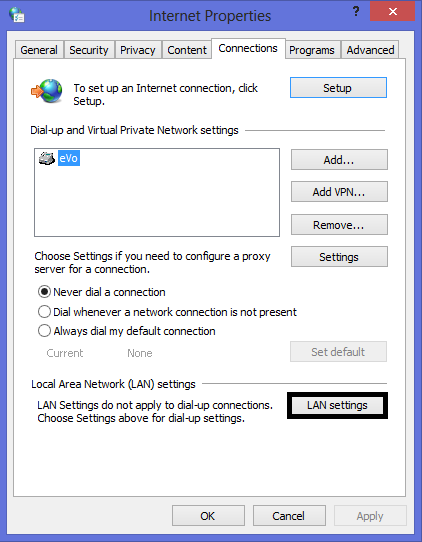
Step 5: In the Internet Properties window click on connection tab and click the LAN settings button.
Step 6: In this window you can change the proxy settings for your computer. We recommend you unchecked Automatically detect settings , use automatic configuration script and check on use a proxy server.After click on use a proxy server in address box put ip address and in port box put port number.

Step 2: Click on Settings in the drop down menu or Click here for go to setting.
Step 3: Select Show advanced settings.This option available at the end of chrome setting page.
Step 4: After click on show advance setting.scroll down and In the Network field, click the Change proxy settings button.
Step 5: In the Internet Properties window click on connection tab and click the LAN settings button.
Step 6: In this window you can change the proxy settings for your computer. We recommend you unchecked Automatically detect settings , use automatic configuration script and check on use a proxy server.After click on use a proxy server in address box put ip address and in port box put port number.
